
STOREFRONTS

Put Your Web Presence
Back in Your Own Hands

Storefronts is the commerce layer of the Vailent ecosystem, a bolt-on to Catalog that turns the product data, technical dossiers and brand you already hold into live, buyer-facing sites. Your own commercial team builds them, publishes them and runs them, with no agency, no developer and no translation vendor in the loop.

Self-Serve
No Agency or Developer
Catalog-Fed
Product Pages
Captured
Every Request a Buyer Makes
0:00 / 2:54

Why Storefronts

Your commercial team manages product pages directly, using the catalog and technical documents you already maintain.

Go deeper.

What it takes off your desk.

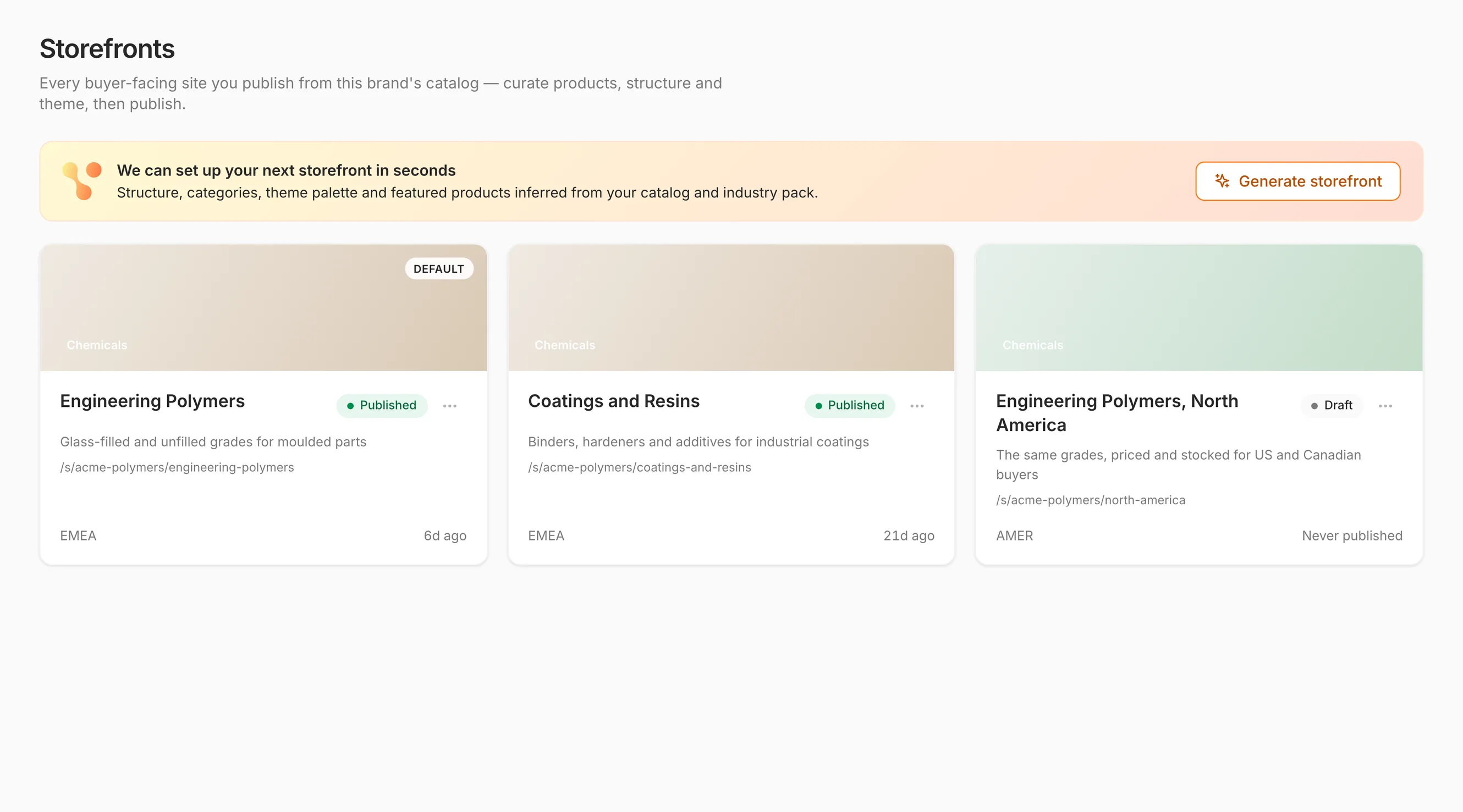
The Storefronts builder, with a panel offering to generate the next storefront from the catalog above three storefronts for one brand, two published and one draft, each with its own public path and region

The Builder01 / 07

Problem

A new site means an agency and two quarters

The Storefronts solution

Stand up a storefront from the catalog you already have, in one workspace, yourself.

Real screenshots of Storefronts in the product, not mockups. The tenant data is a seeded demo.

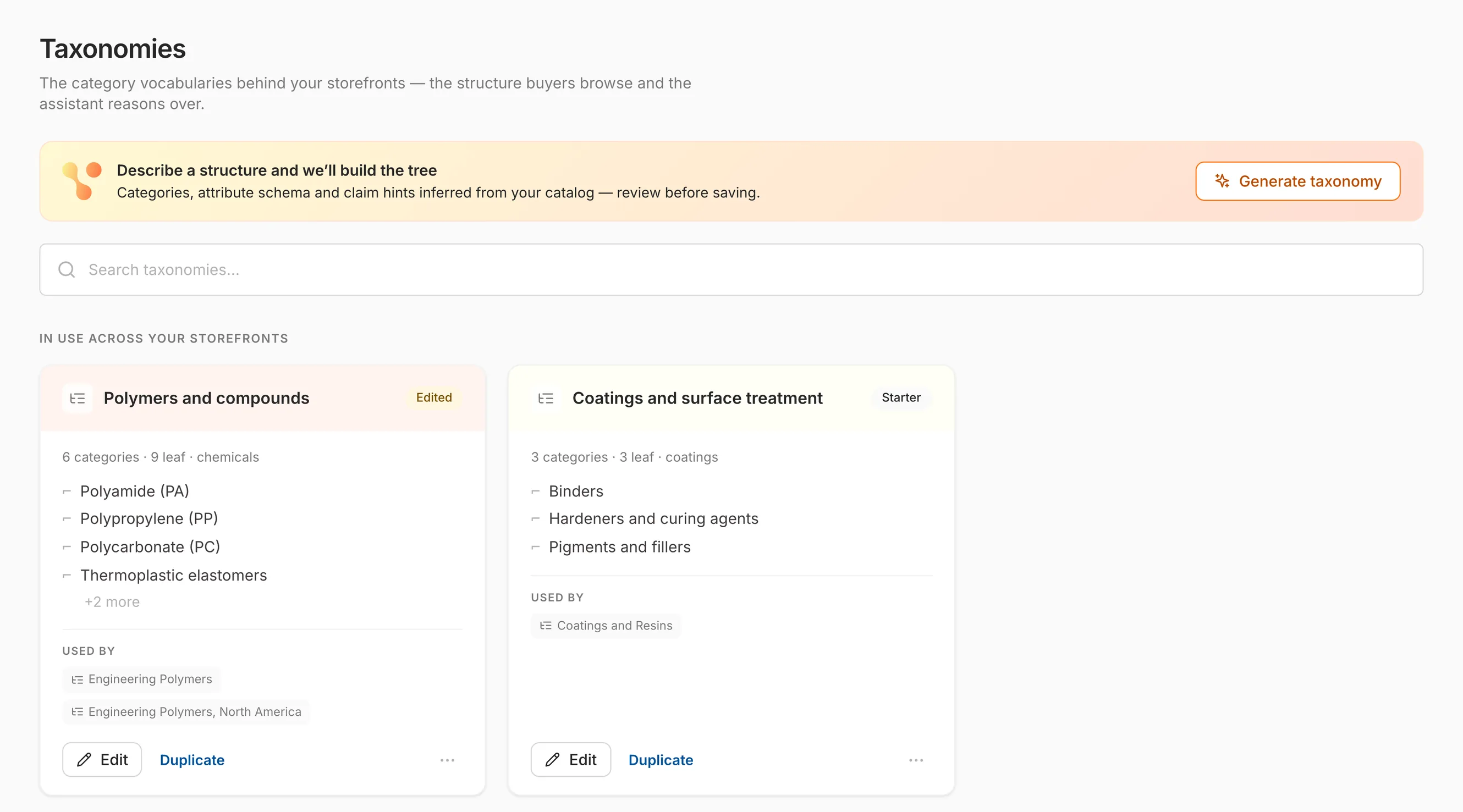
The taxonomies library, showing two category vocabularies drafted from the catalog, one for polymers and compounds and one for coatings, each listing its material families and the storefronts that use it

Structure02 / 07

Problem

Buyers cannot find anything in a flat product list

The Storefronts solution

A browsable structure proposed from your own products, then edited by the people who know them.

Real screenshots of Storefronts in the product, not mockups. The tenant data is a seeded demo.

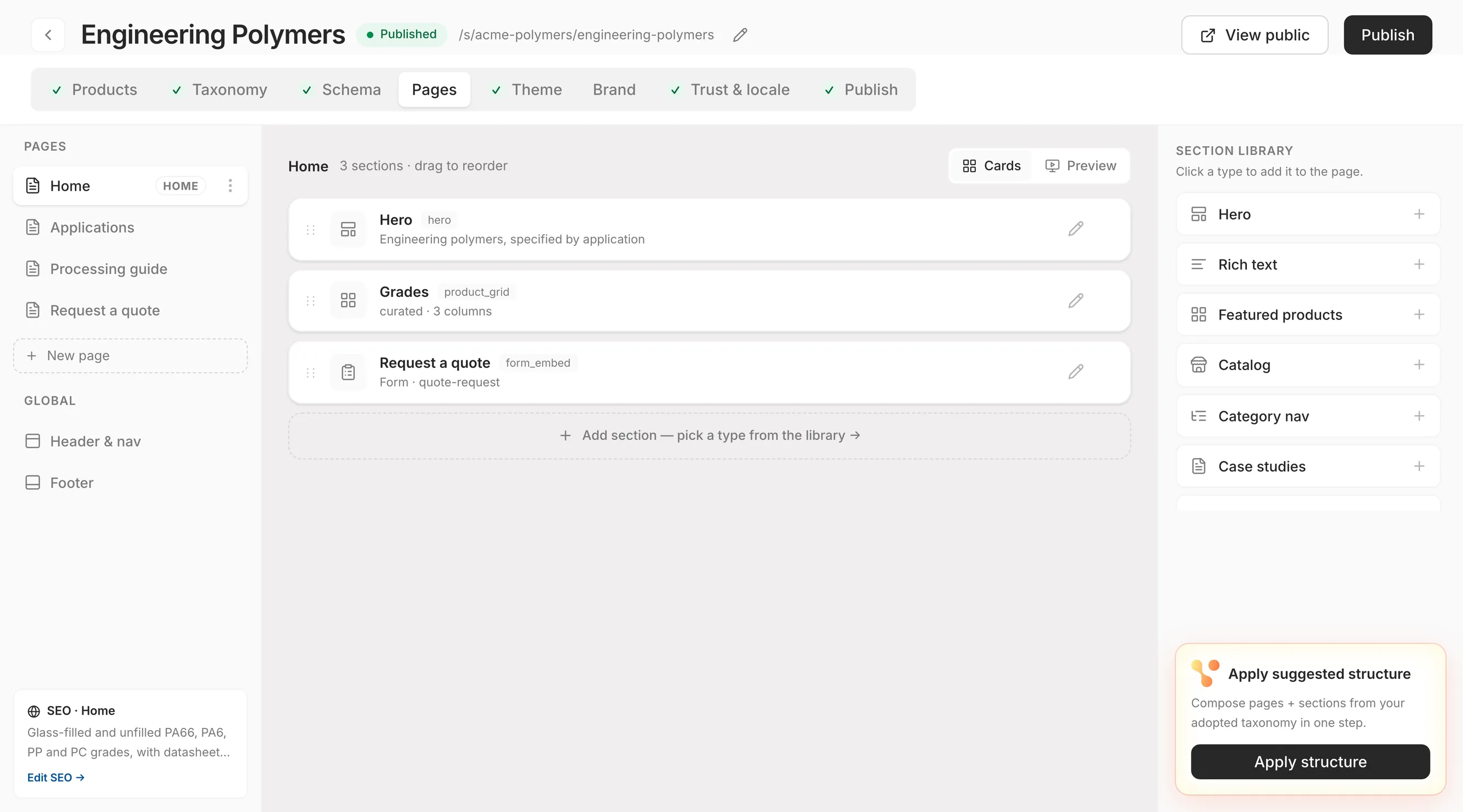
The pages tab of a storefront, showing a home page made of a hero, a curated grade grid and a quote form, beside a library of section types and the page's own SEO title and description

Page Design03 / 07

Problem

Every change waits on a developer ticket

The Storefronts solution

Build the page out of sections you pick, in the order you want, with the SEO written alongside it.

Real screenshots of Storefronts in the product, not mockups. The tenant data is a seeded demo.

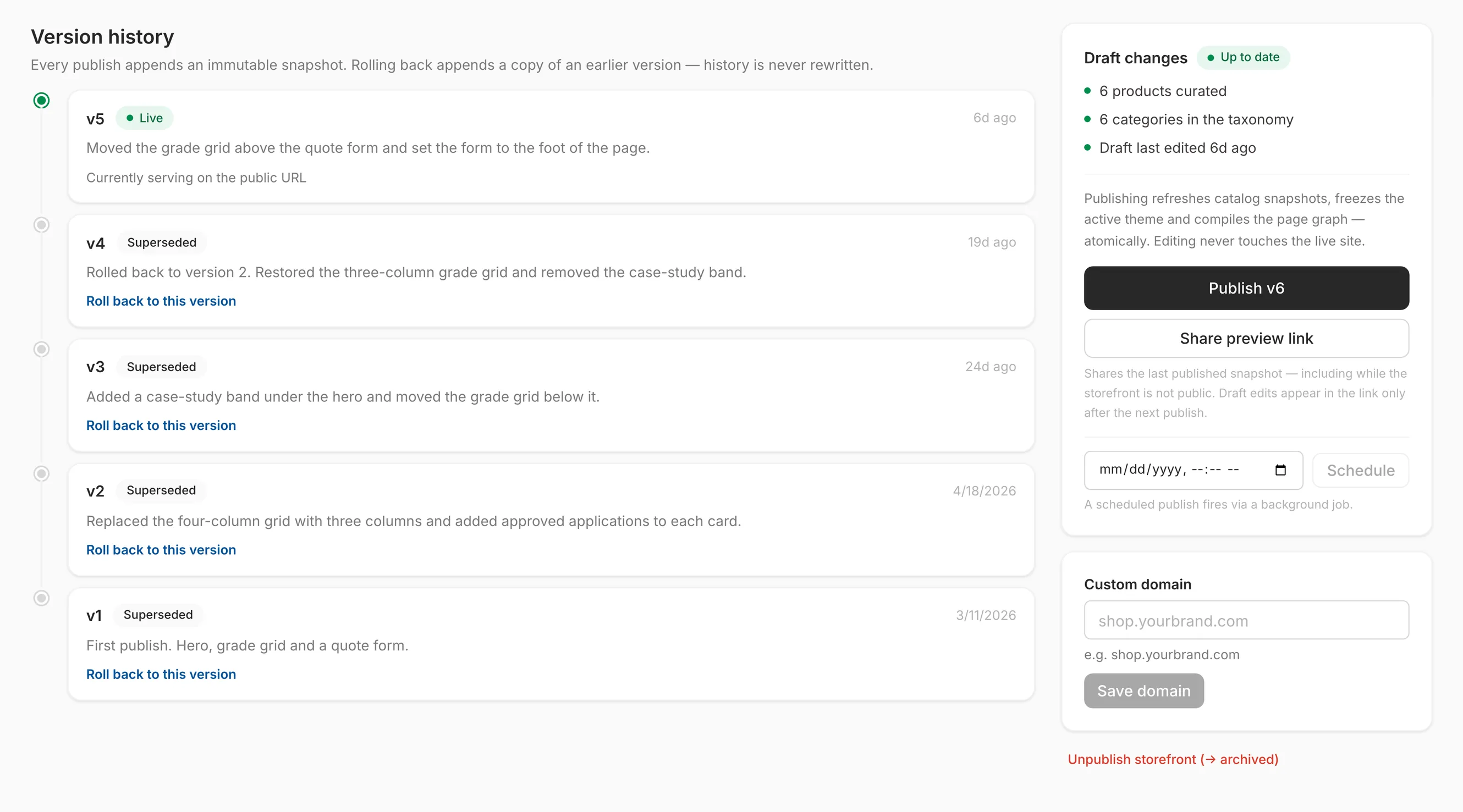
The publish tab of a storefront, showing an immutable version history of five versions with the live one at the top and a rollback recorded as its own version, alongside controls to publish the next version, share a private preview link, schedule a publish and set a custom domain

Publishing04 / 07

Problem

Nobody wants to be the one who broke the public site

The Storefronts solution

Every publish is a snapshot. Preview it privately, schedule it, or roll back to any earlier one.

Real screenshots of Storefronts in the product, not mockups. The tenant data is a seeded demo.

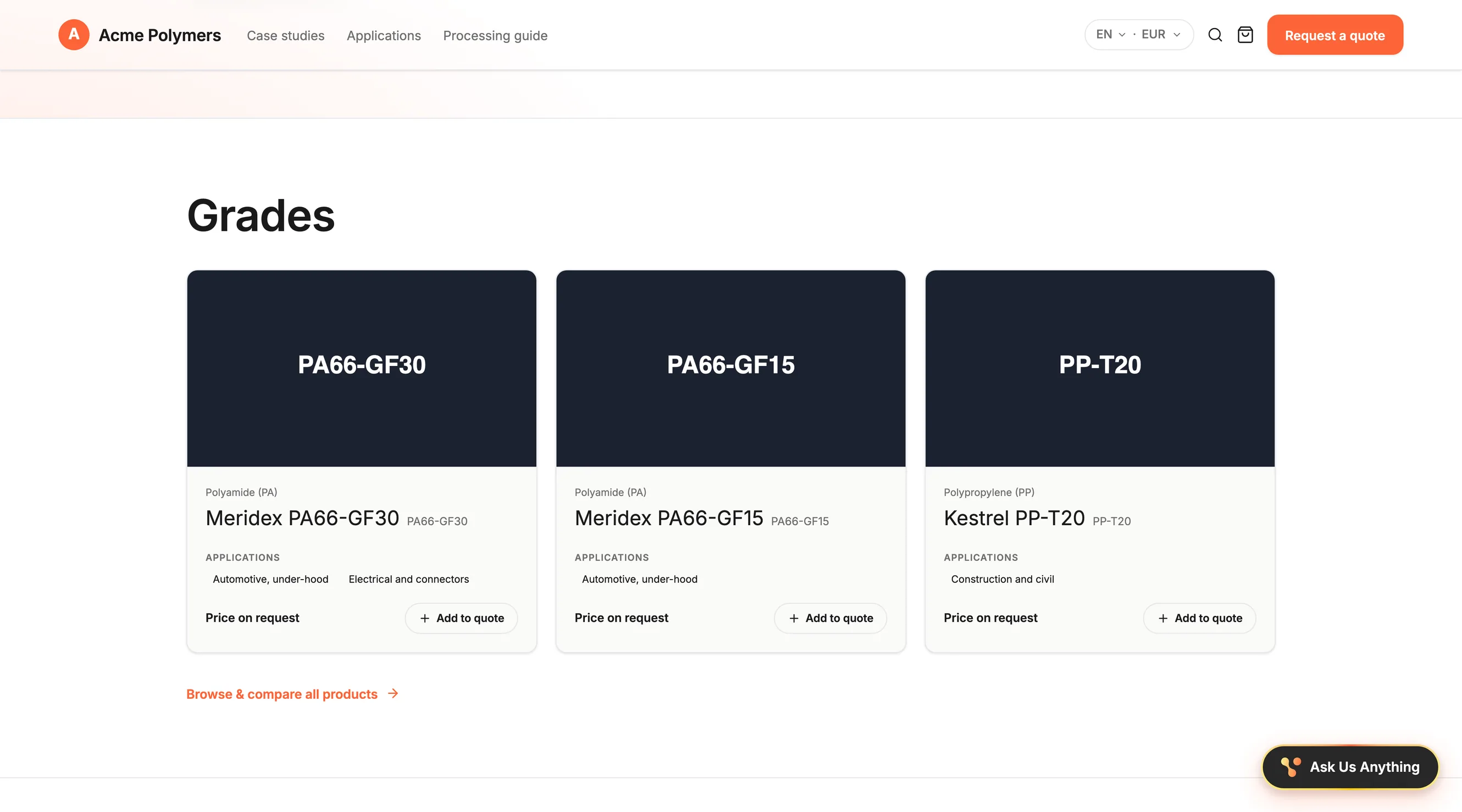
A published storefront for Northbridge Chemicals listing six grades, with a search, filters by category, supplier, material, and application, and grade cards showing each grade's applications, a price per kilogram, Compare, and Add to quote, under a header with a language and currency switcher, a quote cart, and Request a quote

The Live Site05 / 07

Problem

Your products are invisible to anyone without a login

The Storefronts solution

A public site in your brand, carrying the catalog, with no Vailent account in the buyer's way.

Real screenshots of Storefronts in the product, not mockups. The tenant data is a seeded demo.

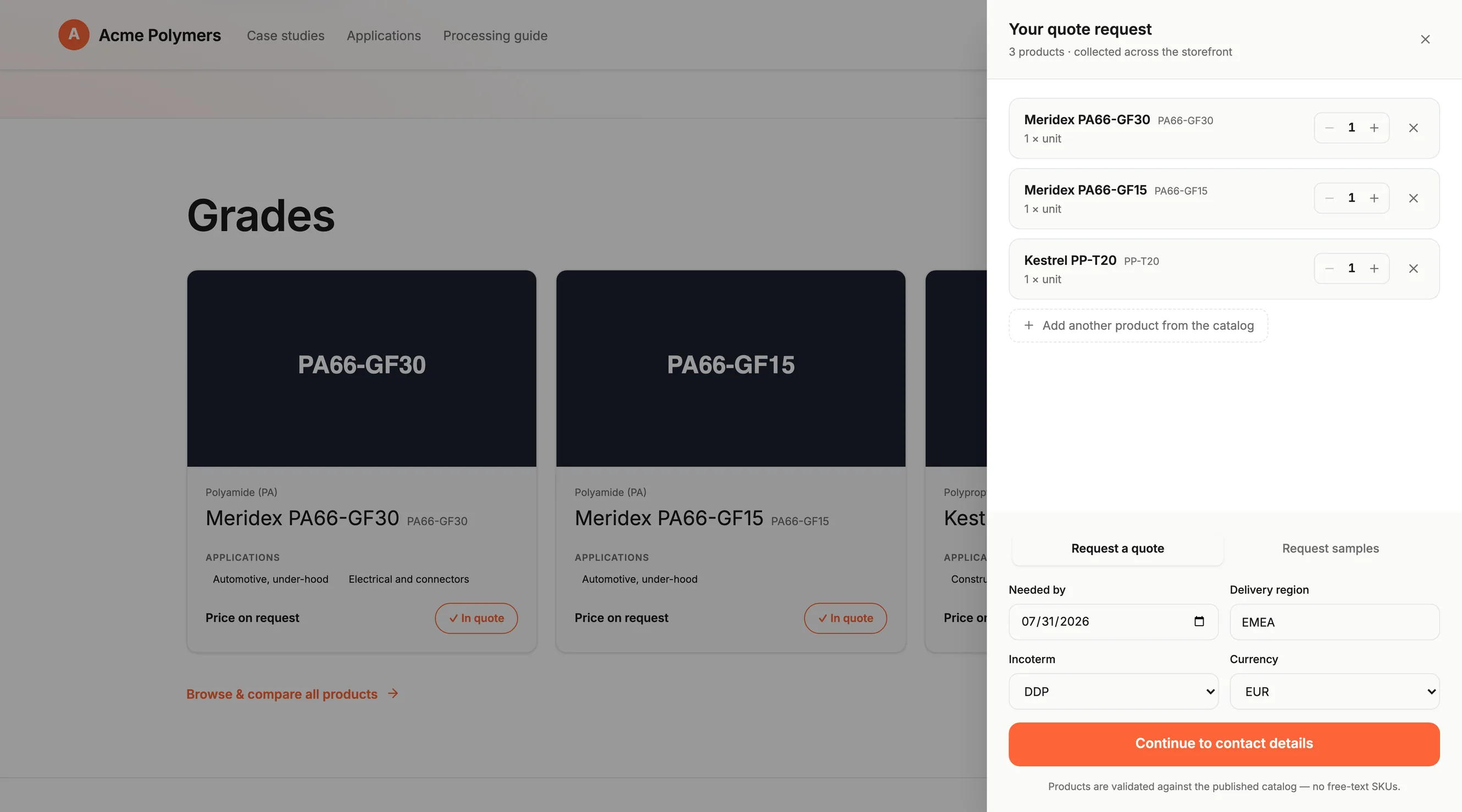
The quote request panel on a Northbridge Chemicals storefront, listing five products collected across the storefront, each with a quantity and a unit, with tabs to request a quote or samples, fields for the needed-by date, currency, and delivery region, and a note that products are matched to the published catalog

Buyer Requests06 / 07

Problem

Interest arrives as an email nobody can act on

The Storefronts solution

The buyer builds the request against your published catalog, so what arrives is already structured.

Real screenshots of Storefronts in the product, not mockups. The tenant data is a seeded demo.

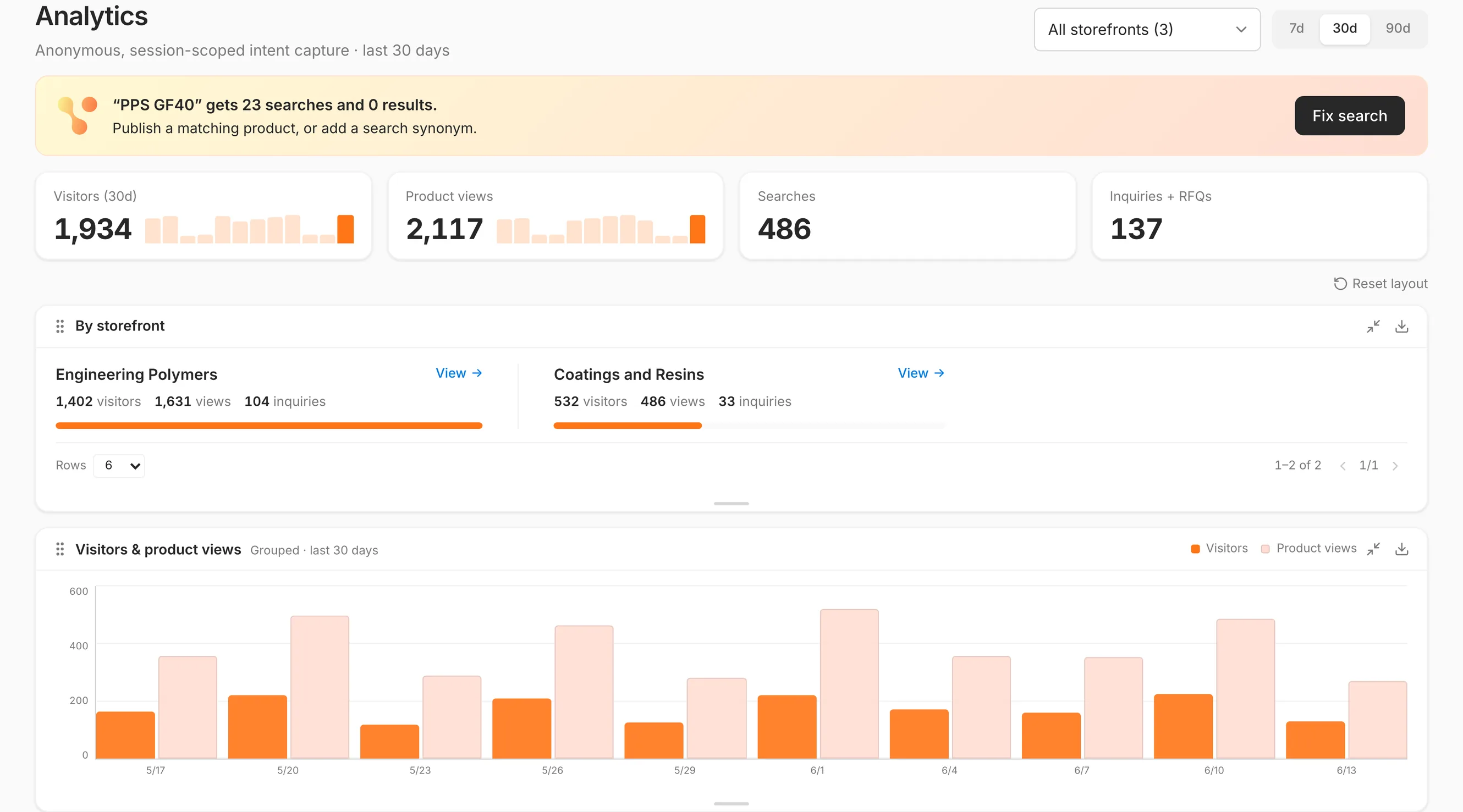
The analytics view across three storefronts, showing an alert that one search returns no results, then visitors, product views, searches and inquiries over thirty days, a per-storefront breakdown and a daily chart of visitors against product views

Demand07 / 07

Problem

You cannot tell what buyers wanted and did not get

The Storefronts solution

What was viewed, searched and abandoned, per storefront, feeding what you stock and promote.

Real screenshots of Storefronts in the product, not mockups. The tenant data is a seeded demo.

How Storefronts fits in our
AI-Native Infrastructure

One storefront. A governed source.See what Storefronts shares with the applications around it.

Storefronts in the platform

Explore a connection

Hover an app to see what connects it to Storefronts. Click an app to explore its connections.

Focus to read the handoff. Press Enter to explore the app.
Storefronts

One storefront. A governed source.

Storefronts

One storefront. A governed source.

Your ERP, if you keep one
On every app

What Storefronts passes on

  • Catalog → StorefrontsProducts, specs, SDS, and TDS
  • Catalog → StorefrontsBrands, one storefront each
  • Storefronts → AssistantQuestions about one product

Tap an app name to explore its connections.

  • Every page is rendered from Catalog. Enrich a product once, correct everywhere.

    Go to Catalog
  • Quote requests are captured on the storefront. Next, they land in Pipeline as leads.

    Go to Pipeline
  • Your Workspace tasks stay one click away in the Storefronts top bar.

    Go to Workspace
  • Nexus keeps Catalog matched to the systems behind your storefront.

    Go to Nexus
  • Next, a buyer can ask about one product on its own page, answered from its specs.

    Go to Assistant
  • Who builds and who publishes follow the roles your company defines.

    Go to Canopy

Elsewhere in the platform

TradePassInventory
THE COMMERCE LAYER

Everything the rest of a web project used to need.

The presentation above walks the build. These are the parts that sit around it, and the reason the second storefront is faster than the first.

Written for Search and for Answer Engines

Every page ships with generated metadata and structured data, tuned both for traditional search and for the AI assistants buyers increasingly ask instead of searching.

Themes You Change Yourself

Colors, gradients, type, radius and texture, saved as a reusable theme. Activate one per brand and it freezes onto that brand's storefronts at the next publish.

Case Studies, Media and Forms

Publish proof next to the products. Customer results, documents and images you want public, and the inquiry forms that collect what a buyer wants to tell you.

An Assistant Your Buyers Can Ask

A buyer describes their application in plain language and gets recommendations, a starter formulation, and links to the exact matching products in your catalog.

Quote Requests Captured on the Storefront

Sample requests and multi-item quote carts are captured on the storefront, with the products, the quantities, and the terms attached. Next, they land in Pipeline as structured leads. Inquiries stay in your Storefronts inbox.

A New Market Is a Setting

Content translates per market on first visit and prices render in the buyer's currency. Opening a language is configuration rather than a translation project.

The Outcome

A web presence the people who own the message can actually change, and a buyer who can find you, understand the grade, and ask for a price without ever meeting a login.

C:\> ¡ 1992
C:\>PRICELIST.EXE ¡ 1992
The way commercial teams ran before.

There's a new way to operate.

Then
a price list, printed monthly, and whoever remembered the exception.
Now
the same knowledge, in front of everyone who needs it, as it changes.